Monday, October 24, 2016

5 settings to change on your new router

Here are five basic settings to look at when configuring a Wi-Fi network router.

My cable provider's modem -- which also acts as my router -- stopped broadcasting a Wi-Fi signal last week. So, I pulled out my old Cisco Wi-Fi router to keep the fire burning until I mustered up the will to visit the Comcast store.

After setting up my old router last week and the new Comcast modem last night, I have a few pointers to share for setting up a Wi-Fi router.

1. Change the network name and password

To change the username and password, you'll need to log into your router's web utility in your browser. Comcast launched its web utility as soon as I connected my laptop to its Wi-Fi network, but if yours doesn't automatically launch, look for the URL for the web utility in your manual. Or you can google it by searching for "[your router name] ip address". For many routers, the address is 192.168.1.1 or 192.168.0.1.

Once you're on that web utility page, you'll need to log in again, but the login information won't be the same as your Wi-Fi login. Usually, the username is "admin" and the password is "password", but you can change these credentials after logging in for the first time. If that combination doesn't work, check your router's manual.
Now you can give your router a unique name and password.
In the web utility, head to the Wi-Fi settings page. Look for a field for Network name or SSID and change the default name to something of your own creation. Also on this page or the Wi-Fi security page, you can change the default password. Choose a password -- or better yet, a passphrase -- that you'll remember but isn't too easy to guess.

2. Choose a security mode

If you set a strong password for your router, then you have taken the first step of securing your network and not leaving it open for anyone to access. With a password set on a modern router, you are most likely using WPA or WPA2 encryption.
WPA, or Wi-Fi Protected Access, is a 256-bit encryption protocol that is more secure than the older, weaker WEP standard that uses 64- or 128-bit encryption. WPA2 improves upon WPA by using a stronger encryption algorithm; WPA2 uses the Advanced Encryption Standard (AES) algorithm that is more secure than WPA and its TKIP (Temporal Key Integrity Protocol) algorithm.
Many routers offer a mixed-mode of WPA and WPA2 so that older devices that pre-date WPA2 can connect to your network, but WPA2 has been around for more than 10 years so I'd wager that most, if not all, of your network devices are compatible with WPA2. When choosing the security mode for your router, I would go with WPA2 -- often listed as WPA2-PSK (AES) -- and only switch to mixed mode if you have an ancient device that won't connect to your WPA2-protected network.

3. Check network mode and bands

If your router is new, odds are it's a 802.11ac model, which broadcasts in two frequencies: 5GHz and 2.4GHz. These are the frequencies with which your wireless network broadcasts radio waves to transmit information. Both frequency bands should be on by default, but in the Wi-Fi area of your router's web utility, check the status of both to make sure they are active.
The 2.4GHz band is more crowded because it's the frequency many common electronics in your household use, from cordless phones and baby monitors to garage door openers and microwaves. You might run into network interference with 2.4GHz, but it allows older devices to connect to your network. The 5GHz band is less congested and faster but has shorter range than the 2.4GHz band.
With both modes operating, your router will choose the best mode for each of your network devices.

4. Enable parental controls

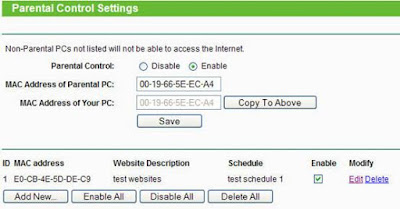
In the web utility, look for a Parental Controls or Access Restrictions section to establish some boundaries for your kids' devices.
You can restrict access to certain sites, though keeping your kids out of the Internet's dark corners by blacklisting individual sites seems like a Sisyphean effort. You can block sites entirely or during certain hours of the day.

ou can also block a network device, like your kid's iPad, from accessing the internet during certain hours of the day, which will put an end to late-night Snapchatting or Netflix sessions. You will need to enter the MAC address of the device you want blocked so your router can identify it. On an iPad or iPhone, for example, you can find the device's MAC address by going to Settings > General > About. You want the number listed for Wi-Fi Address, which is what iOS calls the MAC address.

5. Disable remote management

This setting is usually disabled by default but it's worth checking to make sure it is.
In the Advanced section of your router's web utility you should see a Remote Management or Remote Access area. Make sure this setting is disabled, which means you'll need to be connected to your router's local network in order to access the web utility.
If this setting is turned on, then someone could gain remote access to your router and change your settings and knock you off of your own network.


Friday, October 21, 2016

Kodak's Ektra phone hopes to recapture photography glory days

It would either be very brave or very foolish of Kodak to try and compete with the likes of Apple and Samsung. But with the launch of its camera-focused new Ektra phone, that's exactly what it's doing.

Kodak used to be one of the biggest names in traditional film photography. But the digital era hasn't been kind to it, so the company is looking to the world of phonesto help get some cash back in the bank.
True to Kodak's heritage, the Ektra is aimed squarely at photography enthusiasts. At the camera's core is a 21-megapixel sensor, with a bright f/2.0 aperture lens in front. Kodak claims the camera will be able to capture crisp images in low light, helped by optical image stabilisation and software tweaks.

A physical wheel on the front of the phone lets you change settings quickly -- something that will no doubt appeal to photography purists who like the tactile feel of physical dials. There's also a wide range of scene modes and a manual mode to help you get a bit more creative.
On paper, the phone's camera has plenty to boast about, although whether it delivers on image quality remains to be seen until we take it for a proper test.
The Ektra will need to produce some stunning shots if Kodak truly hopes to make photographers take interest. Photography prowess is one of the mostly hotly contested aspects of top-end phones, with devices such as the iPhone 7, Galaxy S7 and new Google Pixel all capable of taking beautiful photos.
It's interesting to note that Kodak hasn't built the phone itself -- the actual hardware is produced by a company called Bullitt, which it previously partnered with on the Kodak IM5 phone, a much simpler affair with older folks in mind. It's not clear how much work Kodak has had to do on the Ektra beyond slapping its branding on it, but it's hopefully wise enough to not lend its name to a product before checking that it's any good first.
The Ektra will be on sale across Europe later this year and will set you back £449. At the time of launch, Kodak has no plans to launch the phone in the wider world, but that UK price converts to about $550 or AU$720. We'll update this article with more information when it's available.

Specs and features

·         Android 6.0 Marshmallow software
·         MediaTek Helio X20 2.3GHz decacore processor with 3GB RAM
·         32GB storage, expandable with microSD cards
·         13-megapixel front-facing camera
·         3,000mAh battery
·         USB type-C


Monday, October 17, 2016

25 things you don't actually need to keep in the fridge

Make some room in your fridge by storing these room-temperature-happy items in the pantry.


There is probably a bunch of things in your fridge that doesn't need to be there. Removing these items from your fridge can free up space and improve the taste and quality of items that should be stored at room temperature.
Take a look at this list and then go rummage through your fridge.
Hot sauce stays fresh up to 3 years without refrigeration, even after opening it.

Potatoes should be stored in paper bags in cool, dry pantries. Putting them in the fridge can make them taste funny and rot faster.

Onions do best in dry, ventilated areas. Keep them away from potatoes, though. These tubers can make onions rot faster.

Like onions, garlic is just fine in a dry, ventilated area of the pantry.
Basil absorbs fridge smells, so it is best to keep your fresh basil in a cup or vase of water on the counter much like fresh cut flowers. You can also do this with any other fresh herbs.

Your avocado won't ripen? That's because it's in the fridge. Putting an unripe avocado on the counter will make it ripen much faster. To really speed up the process, put it in a bag with a banana or apple.

Putting berries in the fridge can make them rot much faster due to moisture. They'll be fine in a bowl or basket on the counter.

Bread is best when kept at room temperature in a sealed plastic bag. Storing bread in the fridge speeds up the dehydration process and makes it go stale faster.

You might have heard that keeping batteries in the fridge can make them last longer. This is false. The cold can actually be bad for them.

Storing tomatoes in the fridge can alter their flavor and make them rot faster.

Keeping them on the counter in a bowl is your best bet.

Keep coffee out of the fridge and in a dry, air-tight container in the cupboard.

Most squash, especially those with thicker skin, do well for up to a couple months in the pantry.

Honey is the only food that doesn't spoil and it doesn't need to be refrigerated.

Most cakes don't need refrigeration. If it's unfrosted or has a buttercream or ganache frosting, it's fine to store it in an airtight container for around three days.
Uncut melons do best on the counter or in a dry pantry.

Bananas that are unripe should be hung on a banana hook on the counter to ripen. Otherwise, ripe bananas can be stored in the fridge or freezer to prevent further ripening.

Ketchup and mustard can be kept in the cabinet for around a month without refrigeration because they contain acids that inhibit bacteria growth.

Peanut butter doesn't need to be refrigerated and can be kept in the cabinet for months, unless it's organic.

Cooking oils can be kept in the pantry, with the exception of nut oils.

Apples, peaches, nectarines and pears can be kept in a basket in your pantry and will last around a week.

Rice only needs to be kept in the fridge if it's cooked. Dry rice can be stored in canisters or plastic bags in your pantry for years. If it's stored in an air-tight container, white rice can last 8 to 10 years. Brown rice can last 1 to 2 years.

Like rice, dried beans don't need to be refrigerated. In fact, the moisture found in a refrigerator can make beans grow sprouts.

Grandmas and some beauty blogs swear by storing your makeup in the fridge, but makeup was made to be be stored at room temperature. Cold temperatures may destabilize chemical compositions and the humidity can make powders clump together.

Peppers, both spicy and mild, don't need to go in the fridge. They taste much better when stored open-air in a basket on your counter.

Eggplants are hardy enough to keep out on the counter at room temperature.

World's first 5G chip will take future phones supersonic


Qualcomm's new processor, the X50, will appear in devices starting in early 2018 and promises to be 100 times faster than current wireless tech.
5G may be in your phone sooner than you think.
Qualcomm on Monday unveiled the world's first 5G wireless chip, the Snapdragon X50 modem. It's initially aimed at both phones and gear like home wireless networks. And it should be in devices in the first half of 2018.
"5G is right around the corner," Sherif Hanna, Qualcomm staff manager of technical marketing, said in an interview.
The X50 represents the next baby step toward 5G, which is expected to be 100 times faster than our current wireless technology and 10 times speedier than whatGoogle Fiber offers through a physical connection to the home. Typically, when a new wireless technology becomes available, it first shows up in standalone devices like wireless hotspots. But Qualcomm is already working on getting it into phones.

Unless you live in South Korea, you probably won't get to see the X50's power anytime soon. Qualcomm says the chip will likely appear first in phones on networks like Korea Telecom, in time for the 2018 Winter Olympics.
The X50 processor also has some limitations. It only connects to 5G networks, so to hook up to an older 4G or 3G network, you'll need a second wireless chip. Qualcomm hopes phone makers will opt to pair the X50 with its Snapdragon line of processors that integrate the brains of the device with the wireless connectivity. Companies like LG and HTC use Qualcomm's Snapdragon line, but Apple does not.
When the industry moved from 3G technology to 4G LTE, the radio-based "air interface" looked different, but the technology used the same kind of wireless spectrum. That meant companies knew how 4G transmissions would operate in the real world. But 5G is completely different.
"The challenge of that is this is all extremely new," Hanna said.
5G uses very high frequency spectrum known as millimeter waves. They can carry large amounts of data and transfer signals with minimal delays. But signals travel only short distances and have difficult penetrating walls and going around corners, which makes designing 5G networks tricky.
Qualcomm and its handset and network partners hope the X50 chip will help them better understand how 5G will work. Then chipmaker will be able to release "a more complete version" of the technology in its future processors.
"In current devices, our modems support everything, all flavors of LTE, 3G and 2G," Hanna said. "That is the ultimate goal" for the 5G processors as well.
Along with the X50 news, Qualcomm said Australian network operator Telstra is rolling out a gigabit-class LTE network by the end of the year, while Netgear is releasing a hotspot that reaches LTE speeds of up to 1 gigabit per second. Phones will be able to run on the higher speeds in 2017 as carriers upgrade their networks.


Thursday, October 6, 2016

Google vs iPhone comparison

Google's Android and Apple's iOS are operating systems used primarily inmobile technology, such as smartphones and tablets. Android, which is Linux-based and partly open source, is more PC-like than iOS, in that its interface and basic features are generally more customizable from top to bottom. However, iOS' uniform design elements are sometimes seen as being more user-friendly.
You should choose your smartphone and tablet systems carefully, as switching from iOS to Android or vice versa will require you to buy apps again in the Google Play or Apple App Store. Android is now the world’s most commonly used smartphone platform and is used by many different phone manufacturers. iOS is only used on Apple devices, such as the iPhone.

Comparison chart

AndroidiOS
  • current rating is 4.12/5
  • 1
  • 2
  • 3
  • 4
  • 5
(1992 ratings)
  • current rating is 3.86/5
  • 1
  • 2
  • 3
  • 4
  • 5
(1815 ratings)
DeveloperGoogleApple Inc.
Initial releaseSeptember 23, 2008July 29, 2007
Source modelOpen sourceClosed, with open source components.
CustomizabilityA lot. Can change almost anything.Limited unless jailbroken
File transferEasier than iOS. Using USB port and Android File Transfer desktop app. Photos can be transferred via USB without apps.More difficult. Media files can be transferred using iTunes desktop app. Photos can be transferred out via USB without apps.
Available onMany phones and tablets. Major manufacturers are Samsung, Motorola, LG, HTC and Sony. Kindle Fire also uses a modified version of Android. Nexus line of devices is pure Android, others bundle manufacturer software.iPod Touch, iPhone, iPad, Apple TV (2nd and 3rd generation)
Calls and messagingGoogle Hangouts. 3rd party apps like Facebook Messenger, WhatsApp, Google Duo and Skype all work on Android and iOS both.iMessage, FaceTime (with other Apple devices only). 3rd party apps like Google Hangouts, Facebook Messenger, WhatsApp, Google Duo and Skype all work on Android and iOS both.
App store , Affordability and interfaceGoogle Play – 1,000,000+ apps. Other app stores like Amazon and Getjar also distribute Android apps. (unconfirmed ".APKs")Apple app store – 1,000,000+ apps
Video chatGoogle Hangouts and other 3rd party appsFaceTime (Apple devices only) and other 3rd party apps
OS familyLinuxOS X, UNIX
Programmed inC, C++, JavaC, C++, Objective-C, Swift
Open sourceKernel, UI, and some standard appsThe iOS kernel is not open source but is based on the open-source Darwin OS.
WidgetsYesNo, except in NotificationCenter
Internet browsingGoogle Chrome (or Android Browser on older versions; other browsers are available)Mobile Safari (Other browsers are available)
Voice commandsGoogle Now (on newer versions)Siri
MapsGoogle MapsApple Maps (Google Maps also available via a separate app download)
Market share81.5% of smartphones globally (2014), 3.7% of tablets in North America (as of Jan'13) and 44.4% of tablets in Japan (as of Jan'13). In the United States in Q1 2013 - 52.3% phones, 47.7% tablets.14.8% of smartphones globally (2014), 22.8% of tablets globally (2014), 87% of tablets in North America (as of Jan'13) and 40.1% of tablets in Japan (as of Jan'13)
Available language(s)32 Languages34 Languages
Latest stable release and UpdatesAndroid 6.0.1 (Marshmallow) (October 2015)9.3 (March 21, 2016)
Alternative app stores and side loadingSeveral alternative app stores other than the official Google Play Store. It's risky to download apps from other stores because they may be malware.Apple blocks 3rd party app stores. The phone needs to bejailbroken if you want to download apps from other stores.
Battery life and managementMany Android phone manufacturers equip their devices with large batteries with a longer life.Apple batteries are generally not as big as the largest Android batteries. However, Apple is able to squeeze decent battery life via hardware/software optimizations.
Rooting, bootloaders, and jailbreakingAccess and complete control over your device is available and you can unlock the bootloader.Complete control over your device is not available.
File managerYes, available.Not available
Cloud servicesNative integration with Google cloud storage. 15GB free, $2/mo for 100GB, 1TB for $10. Apps available for Amazon Photos, OneDrive and Dropbox.Native integration with iCloud. 5GB free, 50GB for $1/mo, 200GB for $3/mo, 1TB for $10/mo. Apps available for Google Drive and Google Photos, Amazon Photos, OneDrive andDropbox.
Photos & Videos backupApps available for automatic backup of photos and videos. Google Photos allows unlimited backup of photos if you select the low-resolution option. OneDrive, Amazon Photos and Dropbox are other alternatives.Up to 5 GB of photos and videos can be automatically back up with iCloud. All other vendors like Google, Amazon, Dropbox, Flickr and Microsoft have auto-backup apps for both iOS and Android.
SecurityAndroid software patches are available soonest to Nexus device users. Manufacturers tend to lag behind in pushing out these updates. So at any given time a vast majority of Android devices are not running updated fully patched software.Most people will never encounter a problem with malware because they don’t go outside the Play Store for apps. Apple's software updates support older iOS devices also.

Interface

iOS and Android both use touch interfaces that have a lot in common - swiping, tapping and pinch-and-zoom. Both operating systems boot to a homescreen, which is similar to a computer desktop. While an iOS home screen only contains rows of app icons, Android allows the use of widgets, which display auto-updating information such as weather and email. The iOS user interface features a dock where users can pin their most frequently used applications.

A status bar runs across the top on both iOS and Android, offering information such the time, WiFi or cell signal, and battery life; on Android the status bar also shows the number of newly received emails, messages and reminders.
A comparison of some of the features of the upcoming Android N (Nougat) and iOS 10 is here. Android N highlights include:
  • split screen (even on phones that aren't large)
  • display size setting to not only zoom in but also zoom out to make the most of the screen real estate
  • customize which buttons/settings are available in the quick settings launcher
  • support for Google Daydream, a virtual reality platform

User experience

Pfeiffer Report released in September 2013 rates iOS significantly better than Android on cognitive load and user friction.
The overall rating of user experience of mobile operating systems, Pfeiffer Report

Apps Available on iOS vs. Android

Android gets apps from Google Play, which currently has 600,000 apps available, most of which will run on tablets. However, some Android devices, such as the Kindle Fire, use separate app stores that have a smaller selection of apps available. Many originally iOS-only apps are now available for Android, including Instagram and Pinterest, and Google’s more open app-store means other exclusive apps are also available, including Adobe Flash Player and BitTorrent. Android also offers access to Google-based apps, such as Youtube and Google Docs.
The Apple app store currently offers 700,000 apps, 250,000 of which are available for the iPad. Most developers prefer to develop games for iOS before they develop for Android. Since a recent update, the Youtube app has become unavailable on iOS, but iOS still offers some exclusive apps, including the popular game Infinity Blade and Twitter client Tweetbot.
The bottomline when comparing Google and Apple's app stores is that most popular apps are available for both platforms. But for tablets, there are more apps designed specifically for the iPad while Android tablet apps are often scaled up versions of Android smartphone apps. Developers at startups often focus on one platform (usually iOS) when they first launch their smartphone app because they do not have resources to serve multiple platforms from the get go. For example, the popular Instagram app started with iOS and their Android app came much later.

Stability of Apps and the Operating System

The Crittercism Mobile Experience Report published in March 2014 ranked Android KitKat as more stable than iOS 7.1. Other findings from the report include:
  • Android 2.3 Gingerbread has the highest total crash rate, at 1.7%. Other versions of Android — Ice Cream Sandwich, Jelly Bean, and KitKat — have a crash rate of 0.7%.
  • iOs 7.1 has a crash rate of 1.6%., and the rates for iOS 7.0 and iOS 5 are 2.1% and 2.5% respectively.
  • Phone versions of both Android and iOS are more stable than their tablet versions.
  • Crash rates for apps vary by category — games are most likely to crash (4.4% crash rate) and e-commerce apps have the lowest crash rate of 0.4%.

Speed

An iPhone 6s handily beat a Samsung Galaxy Note 7 in on speed test that involved opening several apps one by one, cycling through a set of apps twice. The same set of apps were used for both devices. The iPhone was able to complete two laps in 1m21s while it took the Galaxy Note 2m4s to finish the same task. The Samsung Galaxy Note 7 boasts better hardware specs and is a much newer phone compared with the iPhone 6s.
However, it should be noted that the difference could be in how app publishers develop their apps for Android vs. iOS. Just because the same apps are on both platforms does not mean their internal workings are the same.

Software upgrades

Although Google does update Android frequently, some users may find that they do not receive the updates on their phone, or even purchase phones with out-of-date software. Phone manufacturers decide whether and when to offer software upgrades. They may not offer an upgrade to the latest version of Android for all the phones and tablets in their product line. Even when an upgrade is offered, it is usually several months after the new version of Android has been released.
This is one area where iOS users have an advantage. iOS upgrades are generally available to all iOS devices. There could be exceptions for devices older than three years, or for certain features like Siri, which was available for iPhone 4S users but not for older versions of iPhone. Apple cites hardware capability as the reason some older devices may not receive all new features in an upgrade.

Device Selection

A wide variety of Android devices are available at many different price points, sizes andhardware capabilities.
iOS is only available on Apple devices: the iPhone as a phone, the iPad as a tablet, and the iPod Touch as an MP3 player. These tend to be more expensive than equivalent hardware using Android.

Call Features

Android allows the user to send one of a number of self-composed texts as autoreplies when declining a call.
iOS’s phone app has many abilities, including the ability to reply to a phonecall with a canned text message instead of answering, or to set a callback reminder. It also has a Do Not Disturb mode.

Messaging

Android allows users to log onto GTalk for instant messages. iOS does not offer a native way to chat to non-Apple users. Users can message over Apple users using iMessage or use apps from Google for GTalk and Microsoft for Skype.

Video Chat

Google Hangouts on Android can also be used for video chat, allowing users to chat over either 3G or Wi-Fi. iOS uses Facetime, which can place video calls over both 3Gand WiFi. However, it only allows users to communicate with other Apple devices.

Voice Commands on Android vs. iOS

iOS uses Siri, a voice-based virtual assistant, to understand and respond to both dictation as well as spoken commands. Siri includes many features, such as readingsports scores and standings, making reservations at restaurants and finding movie times at the local theater. You can also dictate texts and emails, schedule calendar events, and interface with car audio and navigation.


Android offers a similar assistant, Google Now, which features the above abilities, plus can keep track of your calendar and give verbal reminders when it is time to leave. It allows for voice search and dictation.

Maps

Apps like Google Maps, Waze and Bing are available for both iOS and Android. When Google released its maps app for iOS in December 2012, the iOS version surpassed the version available for Android in terms of features, design and ease of use. The Android version is not expected to stay behind. Apple's own mapping app, which is bundled with every iOS device, was widely panned when it was launched with iOS 6.

Web Browsing

Android uses Google Chrome as its web-browser, while iOS uses Safari. Both Internet browsers are similar in quality and abilities and Google Chrome is also available for iOS. Safari is not available for Android.

Facebook integration

Android is integrated with Facebook, allowing users to update their statuses or upload pictures from many apps, and to pull contact data from their Facebook friends.

iOS is also fully integrated with Facebook, allowing users to update their status and upload images from various apps, sync their contacts with Facebook, and have their Facebook events automatically added to their iOS Calendar. iOS now offers much deeper integration with Facebook and Twitter because of how tightly it is weaved into core apps on iOS

Mobile payments

Android uses Google Wallet, an app that allows for mobile payments. Some Android phones are equipped with an NFC chip (near-field communication) that is used for making wireless payments simply by tapping the phone at the checkout counter. This service integrates with Google Wallet but is not available on all Android phones or wireless carriers. Mobile payments are supported on devices that have an NFC chip (such as Samsung's Galaxy S4 and S5) as long as they are running a version of Android newer that 4.4 KitKat.
The iOS mobile payment system is called Apple Pay. While Apple Pay was launched over a year after tap-to-pay features on some Android phones, its integration with fingerprint identification arguably makes Apple Pay easier to use. Usage of Apple Pay has certainly been significantly higher. In fact, Apple Pay has kindled interest in mobile payments and prompted Android users to discover the feature on their phones, leading to an increase in use of Google Wallet over NFC.[1] iOS offers Passbook, an app that collects in one place tickets, reward cards, and credit/debit cards.

Security

Android’s applications are isolated from the rest of the system’s resources, unless a user specifically grants an application access to other features. This makes the system less vulnerable to bugs, but developer confusion means that many apps ask for unnecessary permissions. The most widespread malware on Android is one where text messages are sent to premium rate numbers without the knowledge of the user, and the sending of personal information to unauthorized third parties. As it is the more popular smartphone operating system, it is more likely to be the focus of attacks.
Malware writers are less likely to write apps for iOS, due to Apple's review of all the apps and verification of the identity of app publishers. However, if an iOS device isjailbroken and apps installed from outside Apple's store, it can be vulnerable to attacks and malware.
In the real world, the security of an Android or iOS device is only as good as the software updates that have been applied to it. This is where iOS shines because of the fragmented nature of the Android ecosystem. Apple releases software updates and makes them available to all iOS devices at the same time. On Android, Google releases software updates and security patches to Nexus devices. Devices from other manufacturers lag behind because the manufacturer must take these security updates from Google and apply them to their own devices "in the wild". Virtually all manufacturers do a poor job at this. Most don't release patches to devices older than 12-18 months. Even when they do, these security updates are rolled out months after Nexus devices receive them.
That Android devices are less secure is also evidenced by this bounty program; a company that obtains security exploits from hackers and sells them to governments has a bounty on 0-day (i.e., previously unknown) exploits for iOS ($1.5 million), Android ($200,000) and Flash ($80,000). The amounts of the bounties are a rough proxy for how easy it is to exploit these platforms in practice.
So a security-conscious individual or company should use either iOS or Nexus devices.

Privacy

Both iOS and Android are "vulnerable" to a certain kind of privacy leak: an app installed on either platform can get a list of all other apps installed on the same device. This means your calculator app can find out that you use Tinder and relay that information back to its publisher, who is then free to use this info in whatever way they choose. In November 2014, Twitter announced that it is now tracking the list of apps its users have installed on their phones. Twitter is far from being the only company doing this.
Beyond the list of apps, when it comes to protecting users' private information, iOS wins. Until Android Marshmallow was released in 2015, when installing apps on Android, the user was presented with all the permissions that the app is requesting. This was an all-or-nothing proposition. The user could choose to accept the app's request for permissions or not install the app at all. App developers take advantage of this "feature" and request a lot of user information. For example, Pandora's mobile app on Android requests permissions for your Google identity, contacts, calendar, photos, media, files and even call information.
Pandora's app on iOS gets no such permissions. After it is installed and opened by the user, an iOS app may request additional permissions like location and access to Contacts. But the user can reject these permission requests. Even after approving the permission requests, iOS users can quickly glance at which apps have access to theirContacts and location data, and turn off access for apps with which they no longer want to share this data.
Android M (or Marshmallow) allowed a new permissions regime where apps could request permissions as needed. However, a majority of Android apps still take the approach of requesting permissions upfront. While it is possible to manage app permissions on Android at a more granular level, this option is buried deep in the settings.

Building and Publishing Apps for iOS vs. Android

Android apps are programmed using C, C++ and Java. It is an "open" platform; anyone can download the Android source code and Android SDK for free. Anyone can create and distribute Android apps for free; users are free to download apps from outside the official Google Play store. There is, however, a one-time $25 registration fee for developers who want to publish their apps (whether free or paid apps) on the official Google Play store. Apps published on Google Play undergo a review by Google. TheAndroid SDK is available for all platforms - Mac, PC and Linux.
iOS apps are programmed using Objective-C. Developers must pay $99 every year for access to the iOS SDK and the right to publish in Apple's app store. The iOS SDK is only available for the Mac platform.
Some app development platforms - such as Titanium Appcelerator and PhoneGap - offer a way to code once (say in Javascript and/or HTML) and have the platform convert it into "native" code for both Android and iOS platforms.

UI Design for Android vs. iOS 7

In Beyond Flat, SeatGeek founder Jack Groetzinger outlines a lot of the differences in how Android and iOS approach their design aesthetic and what it means for app developers. For example,
  • Buttons:Android buttons are usually monochromatic, with a tendency towards using iconography when possible. The standard iOS 7 button is plain monochromatic text with no background or border. When iOS 7 does use button borders, they tend to be quite simple.
  • The Action Bar of Navigation Bar: The nav bar in iOS is usually just a Back button linking to the previous screen. In Android, the navigation bar usually has several action buttons.
  • Intents: Intents on Android allows applications to flexibly interoperate with each other. For example, apps can "register" themselves as capable of sharing which allows the user to share using this app from any other app.
The article outlines several other differences and is a great read.

The Bottomline: Choosing between iOS and Android

To summarize the key pros and cons of Android and iOS:

iOS pros and cons

  • Massive app ecosystem: distinct advantage for tablet apps while on smartphones popular apps are usually available for both platforms
  • Deeper integration with Facebook and Twitter: it is easier to post updates and share on social networks using iOS than Android because of how deeply integrated these platforms are with iOS.
  • iOS-only apps like Passbook, FaceTime, and mobile payments app Square (available on iOS 3GS,4,4S,5 and up, nut only for a limited Android phones)
  • Interface is locked down: Limited customization options for the home screens; only rows of app icons are allowed. No third-party apps are pre-installed by the wireless carrier. Users can only install apps from the App Store
  • Software upgrades: Apple offers software upgrades to all devices that have the hardware capable of handling the new software. This means devices stay current with software features for at least two to three years.
  • Better privacy controls: iOS offers better control over the access apps have to users' private information such as contacts and location.

Android pros and cons

  • Massive hardware selection: A large number of Android devices are available at various price points, with varying hardware capabilities, screen sizes and features.
  • Highly customizable user experience: The home screen can be customized with not just app icons but widgets that allow the user to stay connected or informed. Other examples include SwiftKey, which modifies your Android smartphone’s keyboard, and apps that emulate older gaming consoles. Google has fewer restrictions than Apple on what kinds of apps it allows in its Play store. Moreover, you can choose to install Android apps from places other than the Google Play store.
Several prominent people have shifted from iPhone to Android. Android's connection to the Google ecosystem of services is strong and arguably more useful compared with Apple's cloud services suite.

AddToAny